
How-to video for measuring area with the Leica Disto D5
Monthly Archives: March 2013

Stake-out Function
One or two different distances (a and b) can be entered into the device and then used to subtract from defined measured lengths. The display always shows the current stake-out distance and a direction arrow. At a distance of 0.1 m to the next stake-out point, an acoustic signal sounds.

Pythagoras Functions
Using the tripod, you can measure distances indirectly, horizontally and vertically. The Leica Disto calculates the result automatically for you from three measurements. Functions such as automatic minimum and maximum measurements help you to measure the right point.
Partial heights, e.g. balcony or window heights, are determined by Pythagoras.
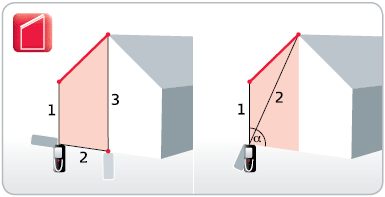
Trapezium Measurements
Using the trapezium function, you can quickly and reliably determine e.g. roof slopes and facade areas. You need only two measurements. The integrated tilt sensor determines the tilt at the same time.

Sloped Object Measurement
With this function, you can e.g. determine the roof slope of a house, even from a long distance away. To do this you take two distance measurements and the Leica DISTO determines the tilt at the same time. Additional detailed information, e.g. the distances and the inclination between
the measured points, is also provided.

Height Tracking
You can determine the heights of buildings or trees that have no suitable reflective points by using the height tracking function. Target with the Point-finder on the bottom point of the height to be measured and take a measurement. Then target on the top point of the object. The display
then shows the height.

Smart Horizontal Mode
The desired horizontal distance is determined using the tilt measurement, even if the object cannot be directly targeted horizontally. This function is very helpful, e.g. if walls, hedges or people are between the instrument and the target.

Tilt Measurement
The tilt sensors in the Leica DISTO can measure inclinations up to +/- 45°, or even have a measurement range of 360°. This means you can also measure inclinations over your head. This is particularly interesting for people who wish to determine roof slopes.

Painter Function
With this function you can determine e.g. the total wall area of a room without having to note down any intermediate results. Simply measure the lengths of the walls, which you can add or subtract as required. Finally measure the room height, which is then automatically multiplied by the previously calculated value.

Triangle and Room Angle Function
The triangle function helps you to calculate, quickly and efficiently, the area of a multi-cornered room. Divide the room into imaginary triangles. Using only three measurements, determine the area of each triangle, which you can add up cumulatively. Pressing a key gives you a detailed display of the room angle, so that you can e.g. quickly check whether it is a right angle.