
Press the left or right top key for about 2 sec.. An overview (“Favorites”) with all functions appears on the display. Choose the preferred function and press then the left or right top key where you want to have the favorite behind. The favorite is now saved.
Tag Archives: Disto E7500i
How accurate is the tilt sensor?
The accuracy of the tilt sensor in the device is +/-0.1° to the housing of the device. To the laser beam the maximum deviation can be up to -0.1° and +0.2°. This applies at room temperature (20°C – 30°C). At any other temperatures the maximum deviation increases by +/-0.1°.
Can I enter a value that is constantly added / subtracted to my measured value? (Offset)
Yes, in the “Settings” you can go to the “Offset Icon” and enter a value that will constantly be added / subtracted from your measured distance value. If an offset value is entered you will see the adequate symbol - a triangle with plus or respectively minus next to the laser symbol.
If you want to set the offset value back to zero, enter the setting “Offset” and reset it.
Why is the laser dot on short distances not centered in the crosshair?
It is the parallax effect due to the distance between the laser window and the digital Pointfinder optics. This effect occurs only when the digital Pointfinder is used on targets below 10 m.
In this case the laser dot appears displaced in reference to the crosshair. This is not an error!
For distances below 10 m please rely on the real laser dot.
Adjusting the brightness of the Digital Pointfinder
D5 & D8
On the screen of the Digital Pointfinder on top of the crosshair you see a symbol existing of a “Sun” and a “+” and “-“. By pressing the “Plus” and “Minus” key you are able to adjust the brightness in 5 steps.
E7500i & D810
When turning the Digital Pointfinder on it is indicated in the display that you can change the brightness with the left and right arrow keys on the keypad.
How many zoom levels does the Disto have?
Disto models with integrated digital Pointfinder in the device has 1x, 2x and 4x zoom.
D5 & D8
You can see on the left up corner which zoom level you have selected. To change from one zoom level to the next one you have to press the “Digital Pointfinder” key.
E7500i
You can see in the middle of the status bar of the screen, which zoom level you have selected. To change from one zoom level to the next one you have to press the “up/down arrow keys”.
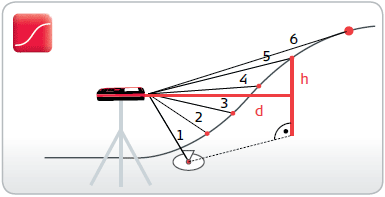
Profile Measurement
Leave a reply
Target the device on a known reference mark and then measure the height differences of other points relative to this. If the measured points are taken all in one direction the profile of the ground can be determined from the measured horizontal distances and the height differences.